Embedding Payments with Claude Code: A Kadima Walkthrough
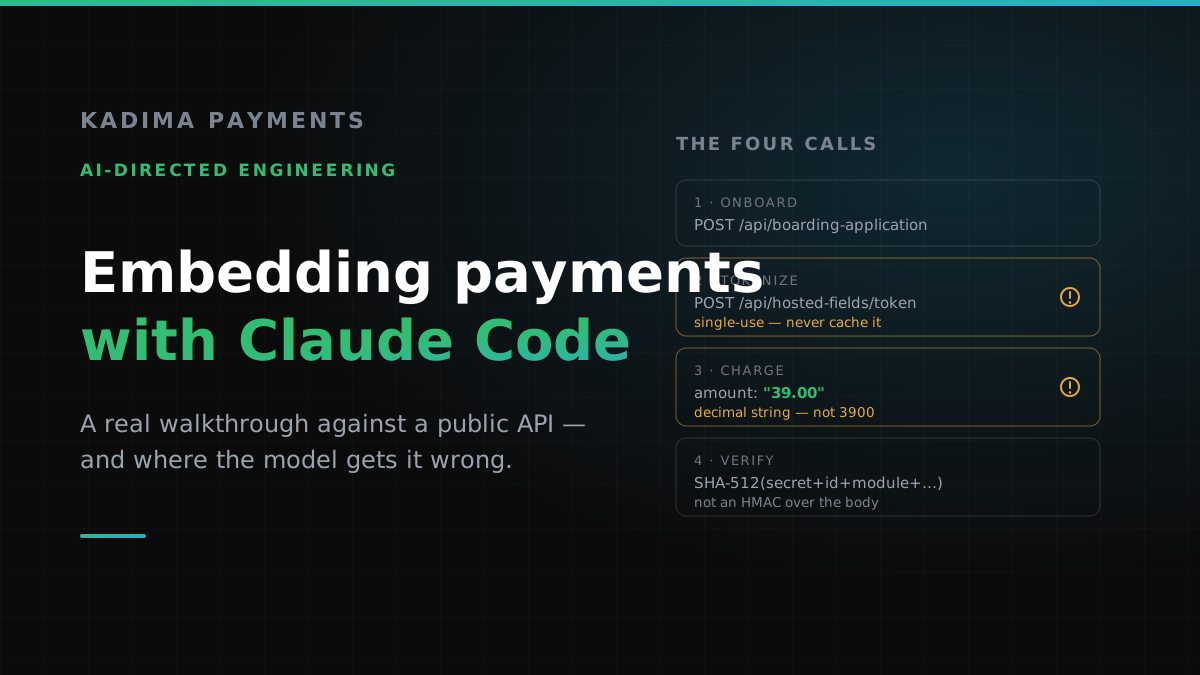
I wrote a piece recently about what AI gets wrong when it writes payment code. The response I got most often was fair: fine, but show me the right way.
So this is the other half. A real integration against our API, the way I’d actually direct an AI tool through it — and the four specific places where a confident model will hand you code that looks correct and is not.
I’m using Claude Code as the example because it’s what our team uses, but nothing here is specific to it. The method is the same with any competent model: give it a source of truth, specify the contract, and check the parts you know are dangerous.
Start by pointing it at the reference
The single biggest quality lever isn’t the prompt. It’s whether the model is working from documentation or from memory.
So before anything else, request a copy of our API reference. Tell us what you’re building and we’ll send it over with sandbox credentials. That step matters more than it sounds: an AI asked to “integrate Kadima payments” with nothing else to go on will produce a beautifully structured integration for an API we do not have. It will invent /v1/charges. It will assume amounts are in cents. It will write an HMAC webhook verifier. All of it will look right, and none of it will work.
So the first move is always the same:
# Give the model the actual contract before it writes anything
# Work from the reference we sent you, not from memory

Use the Kadima API reference in ./docs as the single source of truth
for endpoint paths, field names, and value formats.
Where the docs and your prior knowledge disagree, the docs win.
Flag anything you cannot find in them rather than filling the gap.
That last sentence does a lot of work. “Flag anything you cannot find” converts a silent invention into a visible question, and a visible question costs you thirty seconds instead of a chargeback.
Everything below assumes bearer authentication against https://kadimadashboard.com/api, with a sandbox available at sandbox.kadimadashboard.com for the parts you want to exercise before you point at production.
Step 1 — Onboard the merchant
If you’re a platform boarding your own merchants, this is where you start. A boarding application is created from a campaign, and the campaign determines the pricing and product configuration your merchants land on.
POST https://kadimadashboard.com/api/boarding-application
Authorization: Bearer <your-token>

{
  "campaign": { "id": 206 },
  "processingMethod": "Acquiring"
}

// → 200 { "id": 607, "processingMethod": "Acquiring", … }
Hold onto that id. Everything downstream — principals, documents, equipment, signature — hangs off it, and each of those is its own call with its own required fields, which is why this step is worth walking through with us rather than guessing at. The application is not submittable until the required pieces are attached. This is the least glamorous part of the integration and the part most likely to be quietly incomplete, because an application that is missing a document doesn’t error. It just sits there, unsubmitted, while somebody waits for an approval that was never requested.
Step 2 — Take a card without ever touching one
This is the step that decides your PCI scope, so it’s worth understanding rather than delegating.
The goal is that a raw card number never reaches a server you operate. Our Hosted Fields do that by rendering the sensitive inputs in an iframe we control: the card number goes from the customer’s browser straight to us, and your backend only ever sees a token. That’s what keeps a merchant in SAQ-A instead of SAQ-D, and the difference between those two questionnaires is roughly a weekend versus a quarter.
It’s a two-part flow. Your server mints a short-lived token; the browser uses it to render the form. The shape looks like this — the full parameter set, including the 3DS rules and the shipping data AMEX requires when 3DS is on, comes with the reference:
// 1. Server-side: mint a Hosted Fields token
POST https://kadimadashboard.com/api/hosted-fields/token
Authorization: Bearer <your-token>

{
  "expiration": 15,        // minutes; 30 is the maximum
  "terminal": 3,           // must be active and on our gateway
  "domain": "https://my.website.com",
  "saveCard": "required",
  "3ds": false
}

// → { "access_token": "eyJ0eXAiOiJKV1QiLCJhbGciOiJIUzI1NiJ9…" }
Then the browser renders the form against that token. The field keys are not suggestions — they must be exactly these five:
// 2. Browser-side: render the fields
const form = HostedFields.create({
  token: accessToken,
  amount: 25,
  externalId: orderId,     // optional, max 64 chars, unique per transaction
  fields: {
    "cardNumber":     { target: "#card-number" },
    "cardExpiration": { target: "#card-expiration" },
    "cardCvv":        { target: "#card-cvv" },
    "cardHolderName": { target: "#card-holder-name" },
    "submit":         { target: "#submit-button" }
  }
})
Here is the first thing AI gets wrong. A Hosted Fields token is single-use. One token, one payment. It is also bound to the domain it was issued for, and it expires in at most thirty minutes.
Every one of those constraints reads, to a model optimising for clean code, like an invitation to cache. Tokens are expensive-looking things. Minting one per checkout looks wasteful. So you get this:
// "efficient" — reuses one token
let cached;

async function getToken() {
  if (!cached) cached = await mintToken();
  return cached;
}
// first checkout works.
// the second one fails, and you
// debug the browser, not the cache.
Works in every test that only buys one thing.
// one token per payment attempt
async function startCheckout(order) {
  const { access_token } = await mintToken({
    terminal: TERMINAL_ID,
    domain: SITE_ORIGIN,
    expiration: 15
  });
  return access_token;
}
// cheap, and it is what the API expects
Mint at the start of each attempt. Retries need a fresh one too.
If card saving was allowed on the token, you can retrieve the stored card after the payment completes — POST /api/hosted-fields/card-token returns the token, the BIN, and the expiry. That’s what you keep for repeat billing. You store our token; you never store the card.
Step 3 — The charge, and the units question
Now the part I’d bet money on an AI getting wrong, because it is wrong in the specific way that doesn’t throw.
POST https://gateway.kadimadashboard.com/payment/sale
Authorization: Bearer <your-token>

{
  "terminal": { "id": 24 },
  "amount": "39.00",
  "source": "Internet",
  "card": { "token": "<hosted-fields-token>" }
}
Our API takes amounts as decimal strings. "39.00", not 3900.
Most modern payment APIs use minor units, so that is what a model reaches for by default. Send us 3900 and you have not sent thirty-nine dollars — you have sent a different, much larger charge, and nothing in the response will tell you that you meant something else. It is a valid amount. It is just the wrong one.
Now, if you read the earlier piece, you saw me argue for integer cents end to end. That still holds, and it isn’t a contradiction — it’s the whole point. Compute in integers, where arithmetic is exact. Format to a decimal string once, at the boundary, where the API requires it.
// assumes minor units, like most APIs
const totalCents = 3900;

await sale({ amount: totalCents });
// we read "3900" as $3,900.00

// or the other failure —
await sale({ amount: 39.0 });
// a float, one rounding away
// from "38.999999999999996"
Both are accepted. Neither is what you meant.
// integers internally, string at the edge
const totalCents = 3900;

const toKadimaAmount = (cents) =>
  (cents / 100).toFixed(2);

await sale({
  amount: toKadimaAmount(totalCents)
});
// "39.00" — exactly once, at the boundary
One conversion function, one place to test, one place to be wrong.
Write that conversion as a named function even though it is one line. Not for elegance — so that when you grep for every place money crosses into our API, there is exactly one answer.
Step 4 — Webhooks, and a signature that isn’t what you expect
This is the one I most want people to read, because it is where the AI-generated version is not merely wrong but confidently, conventionally wrong.
Almost every payment provider signs webhooks the same way: HMAC over the raw request body. That convention is so consistent that a model will write the HMAC-over-body verifier without hesitating, and it will look exactly like every correct webhook verifier you have ever reviewed.
We don’t do that. Our Webhook-Signature header is a SHA-512 hash of five concatenated values: your webhook signature secret, then the event’s id, module, action, and date. Not the body. Not an HMAC.
// the industry-standard shape…
const expected = crypto
  .createHmac("sha256", secret)
  .update(rawBody)
  .digest("hex");

if (sig === expected) { /* … */ }

// …which never matches ours.
// So it gets "fixed" by removing
// the check. That is the real bug.
Also === on a secret-derived value: a timing side channel.
if (!secret) return false;   // fail closed

const expected = crypto
  .createHash("sha512")
  .update(
    `${secret}${body.id}${body.module}` +
    `${body.action}${body.date}`
  )
  .digest("hex");

return timingSafeEqual(expected, sig);
Each webhook URL has its own secret. Constant-time compare, length checked.
Look at the first block again and notice how the failure actually unfolds. The verifier doesn’t crash. It just never matches, so every legitimate event gets rejected. Somebody debugging that under deadline pressure reaches the obvious conclusion — signature checking is broken — and disables it. The endpoint starts working immediately. It is also now unauthenticated, and it will stay that way until someone audits it.
I’ll be direct about this: we shipped a version of that bug ourselves. Not the HMAC mistake — a subtler one. Our receivers treated a missing secret as permission to skip verification, on the theory that it made local development easier. That is fine right up until an environment variable gets renamed, at which point a production endpoint silently starts accepting anything. We found it, fixed all four receivers to fail closed, and wrote tests that assert an unconfigured receiver returns 503 rather than 200.
I mention it because the lesson isn’t “AI writes bad code.” It’s that this category of bug is invisible in every test that doesn’t specifically hunt for it, whoever wrote it.
The brief that produces better code
Directing well mostly means front-loading the things a model cannot infer. Here is the core of what I’d hand it before it writes a line — the constraints that bite hardest. The version we give merchants is longer, because it is tuned to what they are actually building:
# Constraints for this integration — verify each against the docs

Base:      https://kadimadashboard.com/api   (bearer auth)
Sandbox:   https://sandbox.kadimadashboard.com

1. Amounts are DECIMAL STRINGS ("39.00"), never minor units.
   Compute in integer cents; convert once, at the API boundary.
2. Hosted Fields tokens are SINGLE-USE and domain-bound.
   Mint one per payment attempt, including retries. Never cache.
3. Card data must never reach our server. Hosted Fields only.
   No PAN, CVV, or full token in logs or error handlers.
4. Webhook-Signature is SHA-512 over
   secret + id + module + action + date — NOT an HMAC over the body.
   Missing secret must fail closed. Constant-time compare.
5. Every charge path carries a stable idempotency key.

Flag anything you cannot confirm in the reference. Do not infer it.
You will notice that four of those five are corrections to defaults a model would otherwise reach for. That is what the specification is for. You are not describing the feature — the model can figure out the feature. You are describing the places where the general pattern and our specific API disagree.
There are more of those than fit in one article. Settlement timing, ACH return codes and the retry rules attached to them, 3DS behaviour across card brands, how declines differ between a soft and a hard response, what your reserve structure does to cash flow — each of those has a right answer for your business specifically, and none of them is something a model can infer from a document. That is the conversation we would rather have with you than have you discover in production.
What to check before it ships
A short review, in the order the mistakes cost you money:
- Amount format — grep every call that sends
amount. Decimal string? Produced by the one conversion function? Any float arithmetic upstream of it? - Token lifecycle — is a Hosted Fields token ever reused, cached, or shared between attempts? Does the retry path mint a fresh one?
- PCI boundary — does a raw card number touch any server you run? Check error handlers especially; they love dumping whole request objects.
- Webhook verification — right algorithm, right fields, fails closed on a missing secret, constant-time compare, length checked first.
- Idempotency — does anything retry a charge? Does the retry carry a stable key?
- Declines — are response codes read and categorised, or collapsed into one generic error? A soft decline you can retry and a hard decline you must not are different events.
- Credentials — can a sandbox token reach production, or a live token reach a test? Does startup fail loudly rather than quietly picking one?
None of this requires distrusting the tool. I use it daily and it makes our team meaningfully faster. It requires knowing which of its confident assertions happen to be wrong for this API — and that is a short, specific, learnable list rather than a reason to go back to typing everything by hand.
Where we fit
None of this is secret. Ask us for the reference and we’ll send it, along with a sandbox to exercise it against — and if you want to build the whole thing yourself with an AI tool doing most of the typing, that is a completely reasonable plan and we’ll hand you what you need to do it.
But there’s a version of this that goes faster. When you tell us what you’re building, we put an engineer who works on this gateway every day next to your integration, and we match your business to the right underwriting path at the same time — so the technical work and the merchant account aren’t two separate projects that meet awkwardly at launch. We’ll look at what your AI wrote with you: amount handling, token lifecycle, webhook verification, PCI boundary. It takes us an hour and it has caught real money bugs.
And if you’d rather not assemble any of it, our Medusa v2 plugin is this same integration, done once, properly, and published to npm.
Either way, the honest summary is this: we have all of these options, and the right one depends on what you’re building. Tell us, and we’ll work through it together.
Let’s move forward.
Building payments into your product?
Tell us what you’re building. We’ll send the API reference and a sandbox, put an engineer who works on this gateway next to your integration, and line up the right underwriting path at the same time.